
ai22 / AI OCR
Invoice digitisation with an audit trail
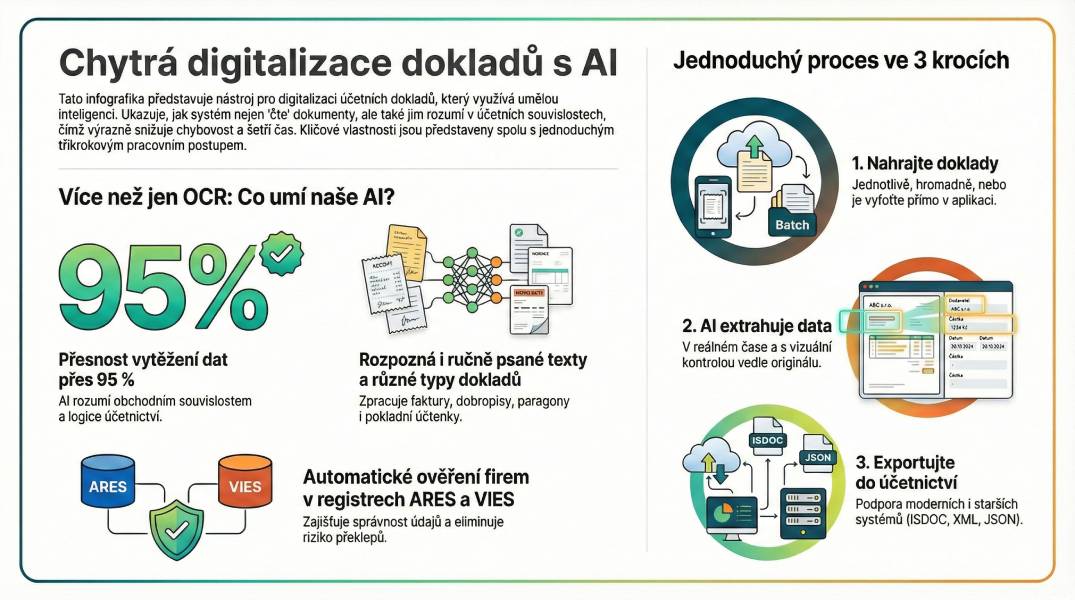
AI OCR reads invoices and accounting documents from PDF, scans and ZIP archives, extracts the fields, checks them against the Czech business register and the EU VIES VAT check, and exports the result as ISDOC, ISDOCX or PDF. Every field carries a confidence score, so a doubtful value is highlighted rather than hidden — the final call stays with the accountant.
What it does
An accountant's day is a queue of documents that all look almost the same and all differ in one or two places. AI OCR takes that queue: it reads each document, pulls out the supplier, the customer, the VAT base, the rates, the totals and the payment details, and puts them into a form an accounting system can read.
What it does not do is guess. Where the reading is uncertain, the field is marked, the document is flagged as needing a review, and the application says why — a control sum does not match, the IBAN is missing, the counterparty is not in ARES. The point is not to remove the human from the loop, but to hand them a document that is already 90% prepared and explicitly says where the remaining 10% is.
How a document runs
1. Upload the document
PDF, a photo of a paper invoice, a ZIP archive of several documents — or an ISDOC file that only needs to be checked. The file is stored in a secured bucket, and a content hash is calculated: if the same document is uploaded twice, the second copy is flagged as a duplicate, is not processed again and is not charged.
2. The document is read as an image
AI OCR does not read the text layer of a PDF. A broken text layer — the usual result of a scan that was run through OCR somewhere else — is exactly what makes automatic extraction fail silently. Instead the PDF is rendered into a clean image and the model reads the document the way a person reads it. On digital PDFs the result is the same, on scans it is markedly more reliable.
3. Automatic checks
Control sums (line price × quantity, VAT, down payments), the IBAN, mandatory fields and the registries are checked automatically. The supplier and the customer are verified in the Czech business register ARES, which fills in the company ID, the VAT ID and the registered address; an EU VIES VAT check can be triggered from the editor on request, because the EU API is slow.
4. Review, approve, export
The editor shows the original document next to the extracted fields. Low-confidence values and validation warnings are highlighted, an AI comment explains what it found, and the accountant corrects what is wrong. Once the document is clean, it is approved and exported.
Accuracy you can see
Extraction from printed documents is highly reliable; photos and handwritten documents are where the error range widens. That is exactly why every field carries a confidence score and why a document can end up in the state requires review. A failed read is not billed — the credits are only deducted after a document has been processed successfully.
Approval workflow
The approval process is optional — without a profile, a document simply runs through digitisation, review and export. With one, you define a code, a name and one to four approval steps (the approver's e-mail, optionally with edit rights), then assign the profile in bulk to marked documents in the feed or to a single document in the editor.
- Approvers are regular users. Registration on the e-mail address listed in the step is enough.
- Only the current step is active. The approver can approve, reject with a reason, or send the document back for correction. A rejection ends the process — the document cannot be exported.
- Everything is logged. The approver sees the document and its data; the decision history stays in the audit log.
Exports and accounting systems
The export follows the Czech ISDOC standard: ISDOC 6.0.2 and 5.2 as XML, ISDOCX as a ZIP with the XML and the PDF, and PDF with the ISDOC data embedded. A single document or a whole batch (as a ZIP) can be exported, and a document with an unfinished approval process cannot be exported at all.
The formats are validated against the ISDOC standard and import into Pohoda, Money S3 and ABRA. For older Pohoda installations there is a compatibility mode that converts down payments and rounding into separate lines.
Credits
Processing is paid in credits: a short document of one or two pages costs one credit, a document of three or more pages costs two. Credits are bought in the billing section and paid by card through Stripe; new accounts get twenty credits on registration. Nothing is charged for a failed attempt, and a duplicate upload is not processed or billed twice.
Questions
Do I need to install anything?
No. AI OCR runs in the browser — there is no desktop client and no local installation.
Where are the documents stored?
The originals and the extracted data live in secured storage. Your account sees only your documents; approvers see the documents that are waiting for their decision.
Can it read a handwritten invoice?
It can try, but the error range is wider than for printed documents — which is why every field carries a confidence score and doubtful documents are flagged for review instead of being exported silently.
Which accounting systems can import the result?
ISDOC 6.0.2 and 5.2, ISDOCX and PDF with embedded ISDOC data — validated against the Czech standard and importable into Pohoda, Money S3 and ABRA.
AI OCR is built by ai22 / Zonix Corp s.r.o. — open the app, read the documentation, the FAQ, or see the other projects.